If you are a skinflint like me and refuse to upgrade to the latest
version of Windows Office you may find this workaround for a notorious
Word 2002 bug helpful.
If you add Footnotes or Endnotes
to a document and then delete one or more you will probably find the
numbering goes bananas. I have tried every fix on the internet to sort
it but only one works for me.
Make your Endnote
changes and save the document. use Ctrl+A to select the whole document,
then Ctrl+C to copy. Open a NEW document (the page layout is not
important) Ctrl+V to paste the document. You should note that the
Endnote numbering is now correct. Ctrl+A to select this modified
document. Go back to the original document which should still show that
it is Selected, if not Ctrl+A again and then Ctrl+C to past in the
modified document. Check that your modification has worked, if so Save.
Best of luck!
Showing posts with label office xp. Show all posts
Showing posts with label office xp. Show all posts
Friday, March 16, 2012

Wednesday, February 29, 2012
Zotero Update
Zotero [zoh-TAIR-oh] is a free, easy-to-use tool to
help you collect, organize, cite, and share your
research sources.
Zotero version 3 has just been released together with a standalone version. Formally only available as a Firefox Add-in the standalone version means you can use Zotero whatever your browser preference. To find out more about the standalone version visit this thread on the Zotero Forum.
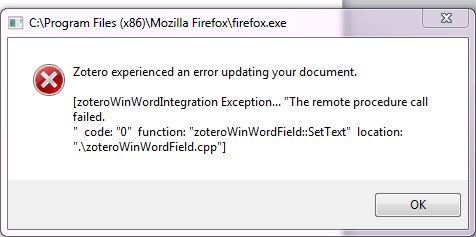
WARNING: After many years happily using Office XP and Word 2002. I upgraded to Office 2010 and obviously Word 2010. Zotero installed ok and appeared in the Add-In tool-bar, however when I tried to insert a citation in my document I received an error message, see below. I searched the Forum for a solution without success. As I am in the middle of a dissertation I do not have the time to resolve the problem so I have reverted back to Word 2002, with which version 3 works fine.

See my previous posts relating to Zotero, the original post, update and Zotero v Endnote.
Zotero version 3 has just been released together with a standalone version. Formally only available as a Firefox Add-in the standalone version means you can use Zotero whatever your browser preference. To find out more about the standalone version visit this thread on the Zotero Forum.
WARNING: After many years happily using Office XP and Word 2002. I upgraded to Office 2010 and obviously Word 2010. Zotero installed ok and appeared in the Add-In tool-bar, however when I tried to insert a citation in my document I received an error message, see below. I searched the Forum for a solution without success. As I am in the middle of a dissertation I do not have the time to resolve the problem so I have reverted back to Word 2002, with which version 3 works fine.
See my previous posts relating to Zotero, the original post, update and Zotero v Endnote.
Subscribe to:
Posts (Atom)